Inventory operations
| Field | Value |
|---|---|
| Screen ID | STK-SCR-003 |
| Module | Inventory |
| Status | Implemented; screenshot current |
| Platforms | Android phone, Android tablet, web equivalent |
| Roles | Manager, Owner |
| Entry | Inventory tab or stock attention link |
| Evidence | Maestro docs-owner-inventory.yaml |
Purpose
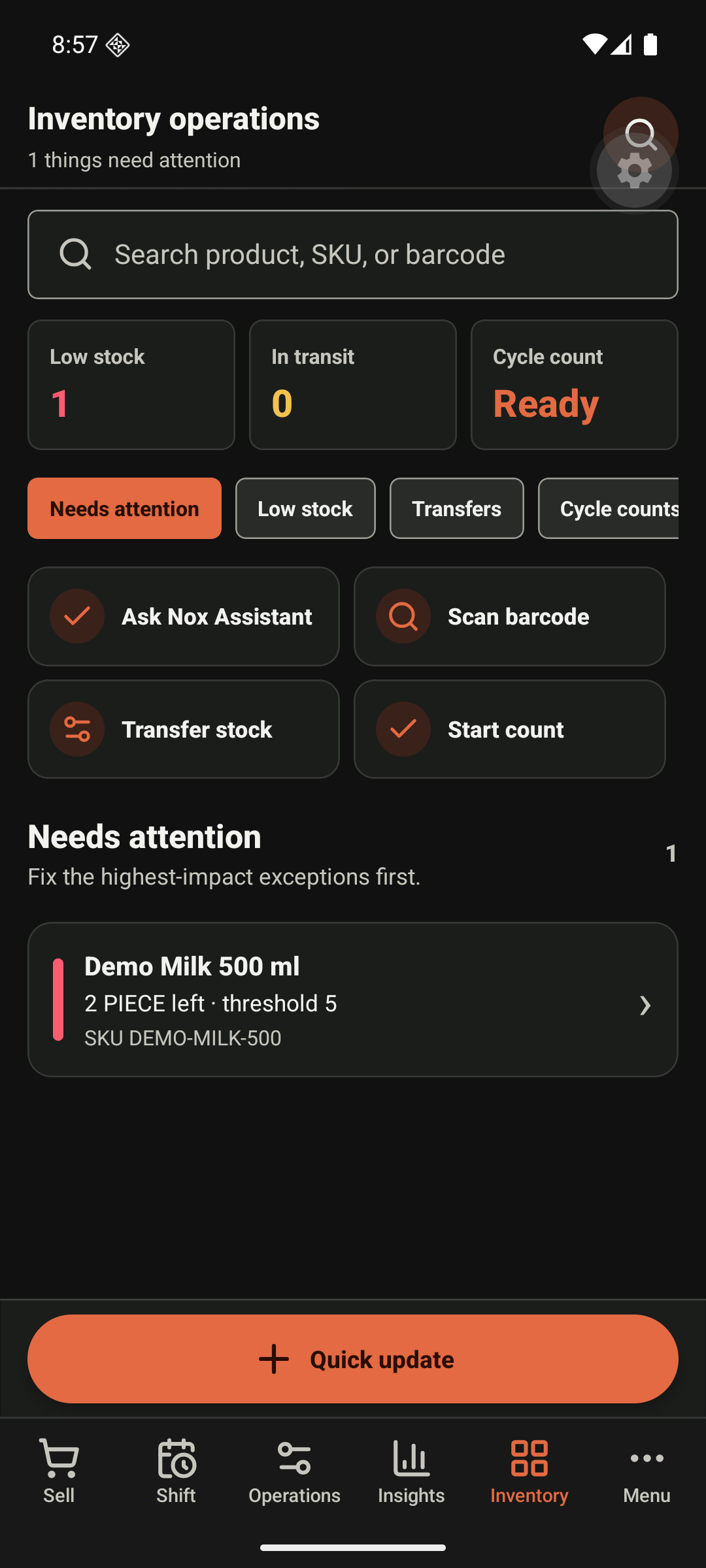
Prioritise low stock and operational inventory work: search, transfer, count, receive, and barcode-assisted lookup.
Actions
Search accepts product name, SKU, or barcode. Low-stock, in-transit, and count readiness are information status cards, never the sole colour cue. Transfer stock and Start count open workflows that preserve location context. Quick update changes inventory only after validation and produces an audit event. An offline update is visibly queued or blocked; it is never silently discarded.
Required evidence
Healthy-stock, no-inventory product, barcode failure, transfer conflict, count validation, receiving success, and manager/owner permission differences.