Sell catalogue
| Field | Value |
|---|---|
| Screen ID | POS-SCR-001 web / POS-SCR-002 Android |
| Module | Point of sale |
| Status | Implemented; Android populated screenshot current |
| Platforms | Web, Android phone, Android tablet |
| Roles | Cashier, Manager, Owner |
| Entry | Sell tab, POS navigation, resumed sale |
| Evidence | Playwright POS capture; Maestro owner-smoke.yaml |
Purpose
Find a sellable product, add it to the active cart, and begin checkout without losing the current order total.
Current Android evidence
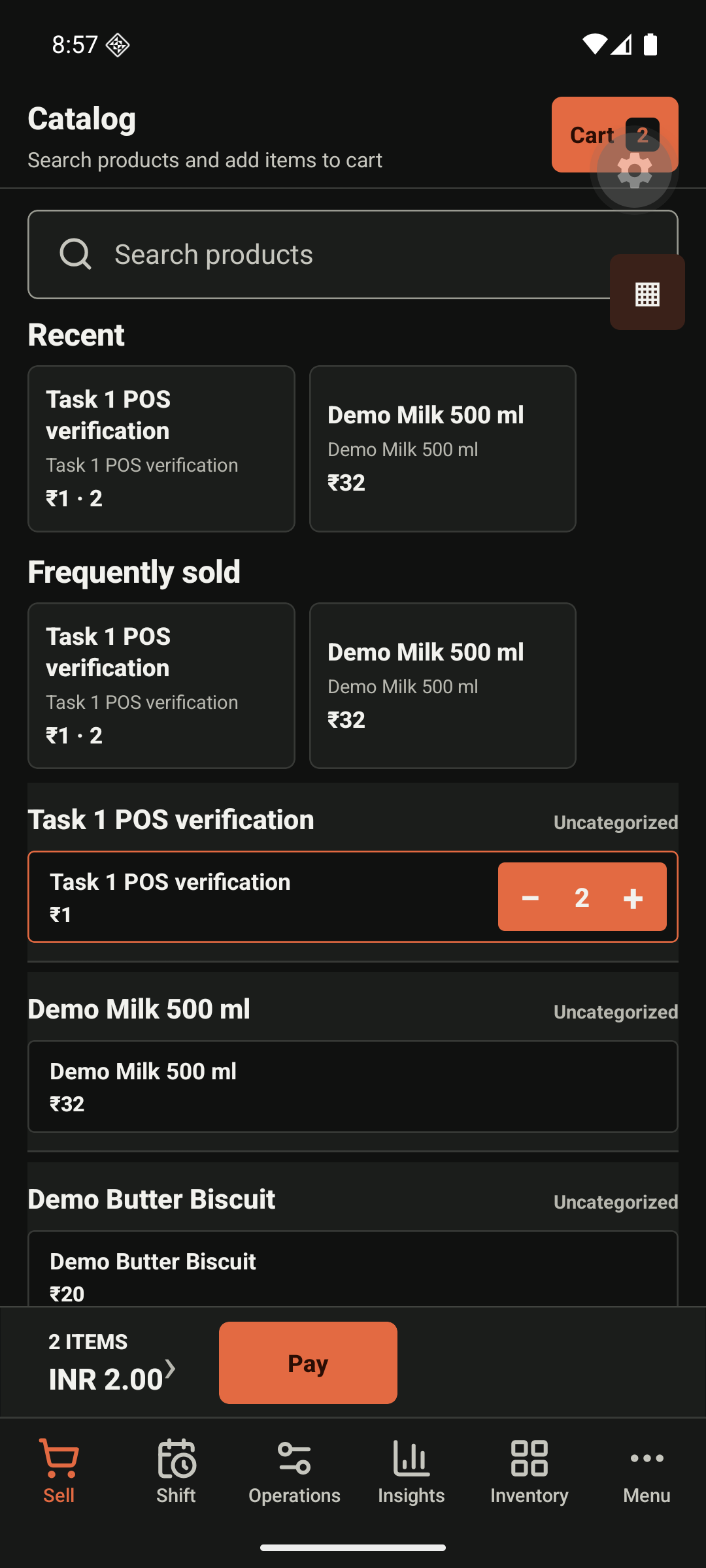
Anatomy and actions
| Region | Purpose | Action rule |
|---|---|---|
| Header and cart badge | Gives the cashier cart count and context | Cart opens without clearing the current sale. |
| Product search | Finds products by displayed name, SKU, or scanned barcode where available | Preserve the query on no-result and provide reset. |
| Recent/frequent products | Speeds up repeat selling | A tap adds one unit immediately. |
| Product catalogue | Browsable product selection | Unavailable products must not be added; show the stock reason where stock rules apply. |
| Cart and Pay bar | Persistent count, total, and primary checkout action | Pay is disabled for an empty cart and guarded against repeated submission. |
States
Default is a seeded catalogue and empty or populated cart. Loading preserves a known cart. Search-with-no-results keeps the query. Network failure must distinguish catalogue refresh failure from an unknown payment result. Offline mode identifies whether a sale can be queued. A protected price override or discount must explain the required manager approval.
Accessibility and responsive rules
Every product tile announces name, price, and stock availability. The Pay action remains reachable on phone; tablet may retain a persistent cart side panel; web supports keyboard search and predictable focus after adding a product.
Remaining evidence
The web populated state, empty cart, no-results, permission, offline, and checkout-start states remain required in the screenshot inventory.